Power Automate MCP: Create, Run and Debug Flows from Chat
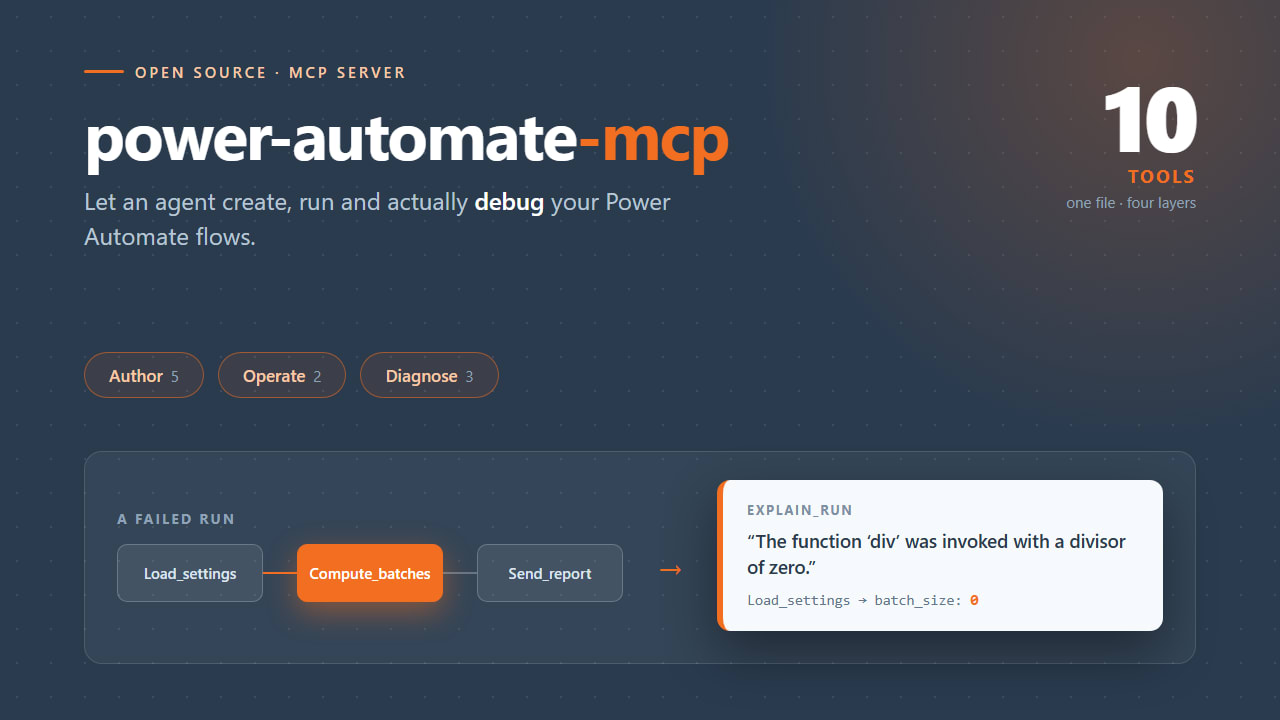
An open-source MCP server with 10 tools that lets an AI agent author, run and actually debug Power Automate flows, including the error messages the API hides behind a signed blob.
Project details
What It Does
power-automate-mcp is a single-file MCP server that exposes 10 tools over the Power Automate management API. Point any MCP client at it and the model can list your flows, read a definition, create one, bind its connections, run it, and then explain why the run failed.
It authenticates through the Azure CLI session you already have, so there is no app registration, no admin consent, and no device-code dance. Sign in with az login, start the server, and the tools work against your default environment.
Run it as a stdio MCP server. That is the right transport here, and it falls straight out of how the server authenticates: it borrows the Azure CLI session already sitting on your machine, so it has to run as a local process next to that CLI. Your client launches it over stdio from a few lines of config, which means no hosting, no public endpoint, no tunnel, and no second auth layer to build. The token never leaves your machine.
The point is not that it wraps an API. The point is the debugging loop below, which the model drives on its own because the tools tell it what they are for.
{
  "mcpServers" {
    "power-automate" {
      "command" "python",
      "args" ["C:/path/to/power-automate-mcp/server.py"]
    }
  }
}
The same block works in claude_desktop_config.json. Use an absolute path to server.py; the server resolves its .env relative to its own file, so the working directory does not matter.
> Create a flow from demo-flow.json and run it.

  create_flow  -> DEMO - nightly batch (8a3f...), Started
  run_flow     -> accepted

> It failed. What happened?

  list_runs    -> 08d8...: Failed
  explain_run  -> Compute_batches failed:
                  "The template language function 'div' was invoked with a
                   divisor of zero."
                  Load_settings emitted {"region": "westeurope", "retries": 3,
                  "batch_size": 0} and Compute_batches divides 120 by batch_size.

> Fix it and run it again.

  get_flow                 -> definition retrieved
  update_flow_definition   -> batch_size: 0 -> 4
  run_flow                 -> accepted
  list_runs                -> 08d8...: Succeeded, output 30
The Problem: A Failed Action Returns error: null
Power Automate does not put the error message on the action record. When an action fails, the API hands you this:
{
  "name" "Compute_batches",
  "properties" {
    "status" "Failed",
    "error" null,
    "outputsLink" {
      "uri" "https://prod-08.westeurope.logic.azure.com/.../ActionOutputs?sv=...&sig=...",
      "contentSize" 285
    }
  }
}
error is null. The real message lives inside a blob behind that short-lived, SAS-signed URL. The maker portal follows the link for you, which is exactly why the portal shows a real error and a naive API wrapper shows you Failed and nothing else.
This is the gap that makes a generic HTTP wrapper useless for debugging, and it is the reason this server exists.
explain_run: The Tool That Justifies the Exercise
explain_run does 2 things a wrapper does not:
- It follows the link. For every failed action it fetches the outputs blob and digs the message out, so the model receives resolved error text rather than
null. - It supplies upstream context. A failure is rarely explained by the failing action alone. The cause is almost always in what an earlier action produced, so the response pairs each failed action with the outputs of the actions that succeeded before it, in execution order.
The result is that symptom and cause arrive together. Compute_batches is where the run died, but Load_settings is where the problem was.
One tool call, in place of roughly a dozen clicks through the run history view. 2 companion tools cover the cases where the error is clear but the reason is not: compare_runs diffs a failed run against a working baseline to find the point of divergence, and analyze_flow_health samples the last 50 runs to tell you whether a flow is flaky or genuinely broken, and which action is responsible.
Architecture: The 4 Layers
Every useful MCP server is 4 layers, and only 2 of them are interesting. The whole server is one file, kept that way so it can be read top to bottom in a few minutes, with the layers appearing in order.
Layer 1, auth. Getting the token is one shell call against a Microsoft first-party app the tenant already trusts. Change the resource constant and the same 3 lines authenticate against Microsoft Graph, Dataverse, or Azure Resource Manager.
Layer 2, transport. One request helper covering the 4 things that always come up: a single 401 retry with a force-refreshed token, 429 with Retry-After honoured, exponential backoff on 503 and 504, and terminal errors re-raised carrying the API's own message, because the model can frequently act on it directly.
Layer 3, shaping. Where the judgement lives. list_flows returns 4 fields per flow where the API returns about 60, mostly GUIDs and internal plumbing. The rule of thumb: if you would not read the field while debugging, the model does not need it either.
Layer 4, docstrings. The docstrings are not documentation for humans, they are the prompt the model reads to decide what to call and how. They carry what each tool returns, which field feeds which other tool, the API's non-obvious constraints, and what each failure mode actually means.
The code is regenerable. The knowledge is the asset.
Layers 1 and 2 were generated in a single prompt, essentially first try. Layers 3 and 4 are hand-written, because they encode things the API does not document and a model could not know.
That split is the whole argument for building your own MCP server rather than waiting for a vendor to ship you one. No vendor can know that your connector always fails this way in your environment.
The 10 Tools
10 tools in 3 groups, sized to cover a complete loop: author, bind, run, diagnose.
| Group | Tools | What it covers |
|---|---|---|
| Author | list_flows, get_flow, create_flow, update_flow_definition, bind_connection | Browse, read, create and modify flow definitions, and attach an existing connection so the flow can start. |
| Operate | run_flow, list_runs | Trigger a run on demand and list recent runs, newest first. |
| Diagnose | explain_run, compare_runs, analyze_flow_health | Resolve the real error, diff against a working baseline, and separate flaky flows from broken ones. |
Gotchas It Encodes
Each of these cost real hours to discover once. Each is now written into the relevant docstring, so the model sees it at call time and nobody pays for it again.
- Connector flows need 2 magic parameters. If any trigger or action is an
OpenApiConnectionvariant, the definition must declare$connectionsand$authenticationat top level. Omit them and creation fails with an HTTP 400 blaming the trigger, which sends you hunting in entirely the wrong place. There is no trigger-versus-action asymmetry; both fail identically. They are harmless on connector-free flows, so always include them. - Creating a flow does not bind its connections. A
201 Createdgives you a flow whoseconnectionReferencesis empty and which cannot be turned on. Passing connection references on the create call does not help; the service rewrites them into a solution-style binding that stays unstartable. The working sequence is create, then update the definition with the references, then start.bind_connectioncollapses all 3 into one call. - Portal-bound and solution flows cannot be updated through this API. The call succeeds and changes nothing. Edit those in the maker portal.
- Look connector operationIds up rather than guessing them. The docstrings say so explicitly, because a guessed operationId produces a flow that creates cleanly and fails at runtime.
Pro Tip
The design rule behind bind_connection generalises: an API that requires a 3-step dance to reach a working state is an API whose tool layer should expose the destination, not the dance. Everything you get wrong twice belongs in a docstring.
Skills: The Layer Above Docstrings
Docstrings teach the model one tool at a time. They cannot teach it the loop: which tool to reach for first, when to move to the next one, and when to stop. That knowledge lives one layer up, in skills, which are markdown playbooks a coding agent loads when the task matches.
2 ship with the repo. debug-flow encodes the diagnose loop: list_runs, then explain_run, then compare_runs when the error is clear but the cause is not, then analyze_flow_health when it recurs, then fix and verify. build-flow encodes the authoring sequence: the definition rules, create then bind then start, and closing the loop with a run after every change.
The division of labour mirrors the 4 layers. Put per-tool constraints in the docstring, put cross-tool workflow in a skill. When the model gets a single call wrong, fix the docstring. When it picks the wrong tool or gives up too early, fix the skill.
Security Posture
The server holds no credential of its own. The only credential involved is the refresh token the Azure CLI already keeps on your machine, which this code never reads, writes or stores. There is no new secret to leak and nothing to rotate if you fork it.
But the server acts as you. Every call uses your delegated permissions, so it can do anything you can do in that environment, including deleting work. The write tools are live: create_flow, update_flow_definition and run_flow change real state with no confirmation step. Point it at a demo tenant. If you want this against production, split the read tools and the write tools into 2 servers and connect the write server only when you mean it.
Project Repository
This is a teaching artifact rather than a complete client. Environment discovery, solution-bound flow editing, HTTP trigger URL retrieval, resubmit and cancel, desktop flows and approvals are all left out on purpose. 10 tools is about the number that fits in a talk while still covering a real loop.
The production server this was extracted from runs 21 Power Automate tools alongside Microsoft Graph and Teams, and it is the same 4 layers throughout. Swap the base URL and the scope and the structure holds for Copilot Studio, Dataverse or Azure DevOps.
- Python
- FastMCP
- Power Automate API
- Azure CLI
- Model Context Protocol
- stdio transport