There is a reflex I keep meeting on client engagements: an integration would be genuinely useful, and the answer is "let's wait until Microsoft ships an MCP server for it." It is an understandable instinct and, most of the time, it is the wrong call. Building the server is no longer the expensive part. Knowing what to put in it always was, and still is.
To make that concrete rather than abstract, I built power-automate-mcp: one Python file, ten tools, that lets an agent create, run and debug Power Automate flows. It is deliberately small enough to read in five minutes, and everything below is drawn from it.
Here is the loop it produces, unedited. Four tool calls, chosen by the model on its own:
> It failed. What happened?

  list_runs    -> 08d8...: Failed
  explain_run  -> Compute_batches failed:
                  "The template language function 'div' was invoked with a
                   divisor of zero."
                  Load_settings emitted {"batch_size": 0} and
                  Compute_batches divides 120 by batch_size.

> Fix it and run it again.

  update_flow_definition   -> batch_size: 0 -> 4
  run_flow                 -> accepted
  list_runs                -> 08d8...: Succeeded, output 30
The model did not guess its way there. It went straight to the right tool because the tools told it what they were for. That is layer 4 doing its job, and it is worth understanding how little of the rest matters.
The four layers
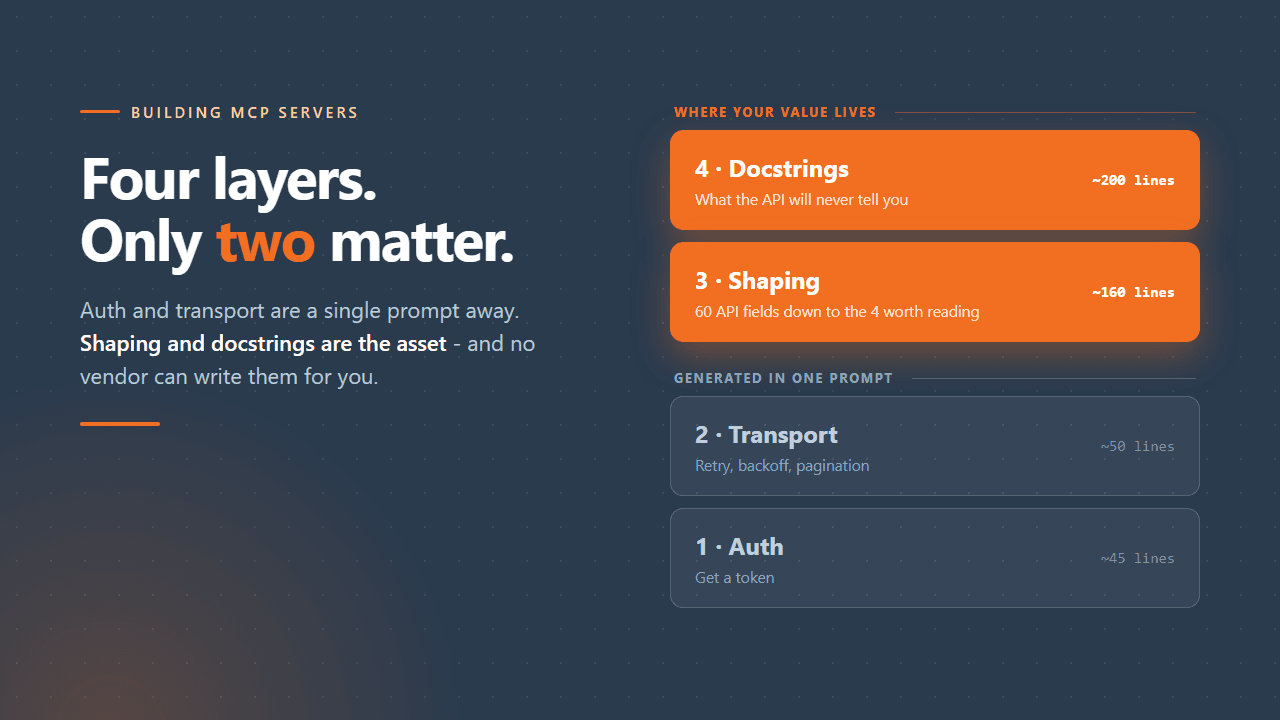
Every useful MCP server I have written decomposes the same way. What changes between them is only which layers cost you anything.
| Layer | What it does | Size here |
|---|---|---|
| 1. Auth | Get a token | ~45 lines |
| 2. Transport | Call, retry, paginate | ~50 lines |
| 3. Shaping | Turn API JSON into model-readable JSON | ~160 lines |
| 4. Docstrings | Teach the model what the API will not | ~200 lines |
Layers 1 and 2 are not interesting, and I mean that as a statement of fact rather than a dismissal. Authentication here is a single shell call against a Microsoft first-party app the tenant already trusts, which removes the app registration, the admin consent and the device-code dance in one move. That only works because the server runs as a stdio process on your own machine, launched by the MCP client, so it can reach the CLI session already sitting there - which is the general rule for anything borrowing local credentials: stdio first, and reach for a hosted transport only when something genuinely remote has to call you. Transport is one request helper covering the four things that always come up: retry a 401 once with a refreshed token, honour Retry-After on a 429, back off on 503 and 504, and re-raise terminal errors carrying the API's own message. I described both in a prompt and they worked essentially first try.
If that is the part you were dreading, stop dreading it. It is solved.
Layer 3: shaping is a judgement call
list_flows returns four fields per flow. The Power Automate API returns about sixty, mostly GUIDs and internal plumbing.
Handing the raw payload to a model does three bad things at once: it burns context you will want later, it buries the signal in noise, and it makes the model slower and measurably less accurate. So you cut. And the cutting is the part that cannot be automated, because which fields matter depends entirely on what you do with flows - which is knowledge that lives in your head, not in the OpenAPI spec.
The rule of thumb I keep coming back to:
One more thing belongs in this layer: caps. A single enormous action payload should not be able to blow up the context window, so every field gets trimmed at a fixed ceiling. It is two lines of code and it is the difference between a server that degrades gracefully and one that occasionally destroys a session.
Layer 4: docstrings are the moat
This is the part that gets skipped, and it is the part that compounds.
An MCP docstring is not documentation for humans. It is the prompt the model reads to decide what to call and how. It should carry what the tool returns, which field feeds which other tool, the API's non-obvious constraints, the failure modes and what they actually mean, and explicit instructions where the model is likely to improvise badly.
A concrete example from this server. If any trigger or action in a Power Automate flow definition uses a connector, the definition must declare two parameters at top level:
"parameters" {
  "$connections"    { "defaultValue" {}, "type" "Object" },
  "$authentication" { "defaultValue" {}, "type" "SecureObject" }
}
Omit them and creation fails with an HTTP 400 saying the trigger is missing $authentication. That message is actively misleading. There is no trigger-versus-action asymmetry at all - connector triggers and connector actions fail identically without the block - but the error sends you inspecting your trigger, which is fine, for as long as you care to look at it.
That cost me real hours to discover once. It now costs nobody anything, forever, including every future model that reads the docstring. That asymmetry is the entire argument.
The proof: a tool a wrapper cannot give you
If layers 3 and 4 sound like polish, here is the case that settles it.
Power Automate does not put the error message on the action record. A failed action comes back like this:
{
  "name" "Compute_batches",
  "properties" {
    "status" "Failed",
    "error" null,
    "outputsLink" {
      "uri" "https://prod-08.westeurope.logic.azure.com/.../ActionOutputs?sv=...&sig=...",
      "contentSize" 285
    }
  }
}
error is null. The real message lives inside a blob behind that short-lived, SAS-signed URL. The maker portal follows the link for you, which is exactly why the portal shows you a usable error and a naive API wrapper shows you Failed and nothing else.
So the tool does two things a wrapper does not. It follows the link, fetching the outputs blob for every failed action and digging the message out. And it supplies upstream context, because a failure is rarely explained by the failing action alone - the cause is almost always in what an earlier action produced. The response pairs each failure with the outputs of the actions that succeeded before it, in execution order.
One tool call, in place of about a dozen clicks through the run history view. No amount of generating a client from a spec produces that behaviour, because the spec does not say "by the way, the error is somewhere else."
Where this generalises
The structure is portable, which is the practical payoff. Change the resource constant and the same three lines of auth work against Microsoft Graph, Dataverse or Azure Resource Manager. Swap the base URL and the scope and the same four layers hold for Copilot Studio or Azure DevOps. That is why I keep the file organised the way it is.
Two questions I get, answered plainly:
Why not just use an official server when one exists? Use it when it covers you - this is not an argument for building everything yourself. The reason to build your own is layer 4: no vendor can know that your connector always fails this way in your environment. You also frequently want three different APIs behind one server, which nobody ships for you.
How long does it take? The honest answer, and the more useful one: the ten tools are an evening. The docstrings are months of hitting the same walls repeatedly. You are not building a server, you are writing down what you already learned so that you never learn it twice.
One layer above: skills
A closing note on the thing docstrings cannot do. They teach the model one tool at a time; they cannot teach it the loop - which tool to reach for first, when to move on, and when to stop. That belongs one layer up, in skills: markdown playbooks an agent loads when the task matches.
The division of labour is the same one the four layers made. Per-tool constraints go in the docstring, cross-tool workflow goes in a skill. When the model gets a single call wrong, fix the docstring. When it picks the wrong tool or gives up too early, fix the skill.
The full server, both skills, and the gotchas above are on GitHub, and there is a longer walkthrough of the implementation on the project page.